
Skip to content
Solutions
Company
Customer and internal service operations

Swaves ERP · Applications

Service Desk

Turn requests into owned work with visible response commitments. Service Desk supports email and portal intake, team assignment, priority, service-level targets, customer communication, escalation, resolution history and self-service knowledge.

Email and portal intakeAgent and team queuesSLA and escalationCustomer self-service
Every accepted request has a visible state, priority and ownerResponse and resolution targets reflect agreed service rulesCustomers can follow progress and continue the conversationResolution evidence becomes reusable operating knowledge

Actual application interface from the official module documentation; final configuration and scope are confirmed per deployment.
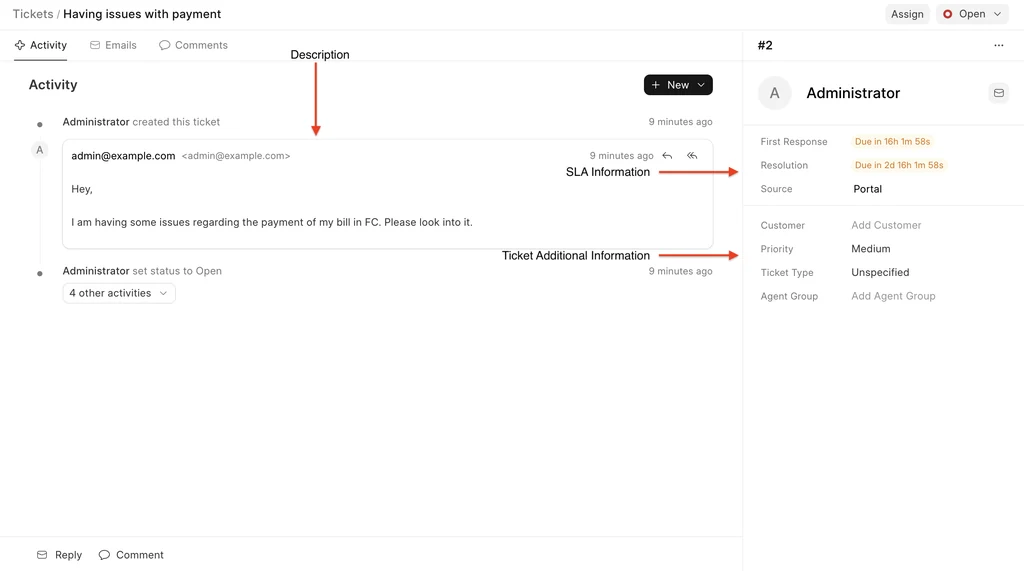
Service desk applicationSupport ticket
Frappe Helpdesk support ticket with status, customer and conversation context
Actual application interface from the official documentation. View source · CC BY-SA.
01Lead
02Quotation
03Sales order
04Delivery
05Invoice
06Collection

Working coverage

Capability where the transaction and responsibility meet.

Customer support, shared services and internal operations teams that need a disciplined queue without losing customer, asset or transaction context.

Request intake

Accept structured requests without scattering them across private inboxes.

  • Email-created tickets
  • Customer portal
  • Configurable forms
  • Type and priority
  • Customer and contact context
  • Attachments and conversation

Queues and assignment

Route work to the right team and keep responsibility visible throughout the case.

  • Agent and team assignment
  • Automatic assignment rules
  • Queue and list views
  • Priority and status
  • Internal comments
  • Reassignment and escalation

Service levels

Apply response and resolution targets using the working calendar and matching service policy.

  • Conditional SLA policies
  • Priority-based targets
  • Working hours and holidays
  • First-response due
  • Resolution due
  • Breach and fulfilment status

Customer communication

Keep replies, status and satisfaction with the service record.

  • Agent email reply
  • Customer portal updates
  • Canned responses
  • Reopen by response
  • Closure and feedback
  • Communication timeline

Knowledge

Turn approved resolutions into articles that reduce repeated service effort.

  • Knowledge-base articles
  • Categories and navigation
  • Public or restricted access
  • Linked resolution context
  • Search and self-service
  • Review and maintenance ownership

Business context

Connect the case to the customer, product, asset, order or project information needed to resolve it.

  • Customer and organisation
  • Product or service
  • Asset or serial context
  • Order and invoice reference
  • Project or contract
  • Escalation into accountable operations

End-to-end flow

From request to confirmed resolution

The request remains visible as it is classified, assigned, investigated, resolved and closed—or returned for further work.

01

Accept

Create the ticket from an approved channel and acknowledge its reference and current state.

Service desk
02

Classify and route

Set type, priority, service policy and the responsible team or agent.

Queue control
03

Investigate

Use the customer, conversation and linked business context to work the issue.

Assigned agent
04

Resolve

Record the action, communicate the outcome and move the ticket to resolved status.

Agent and resolver team
05

Confirm and learn

Close on customer confirmation or policy, capture feedback and update reusable knowledge.

Service owner

Role views

The same process. Different working context.

Each person sees the queues, measures, records and actions that belong to their responsibility.

01

Customer

Transparent service

New requestCurrent statusConversationKnowledge
02

Agent

Owned resolution

My ticketsSLA dueCustomer contextReply and notes
03

Team lead

Queue health

UnassignedAt riskBreachedEscalations
04

Service owner

Service quality

VolumeResponseResolutionFeedback and recurring issues

Controls retained in the flow

  • Agent and customer permissions
  • Queue assignment
  • SLA policy order
  • Internal versus customer-visible notes
  • Escalation responsibility
  • Closure and reopen policy

Configured for the operating model

  • Ticket types and priorities
  • Teams and agents
  • Assignment rules
  • Working calendars
  • SLA policies
  • Portal, email and knowledge settings
Email, chat, telephony, messaging, customer identity and external service integrations require provider-specific design and are not represented as universally available connectors.

Connected applications

Continue the operating cycle.

Move into the responsibilities that sit immediately before, after or alongside this application.

Foundation and attribution

Open foundations. Swaves delivery accountability.

Swaves ERP solutions may use and extend established open-source business platforms, including the ERPNext and Frappe ecosystem, alongside Swaves configuration, integration and managed services. Capabilities and interface patterns shown here are referenced against current published module documentation. ERPNext and Frappe are trademarks of their respective owner. Swaves does not claim partner certification, endorsement or ownership of upstream products.

Start with the operating model

Bring the process that is losing control first.

Current companies, sites and systemsUsers, roles and approval authorityPriority process and known exceptionsMigration, statutory and integration requirements